

Overview
Many browser automations need login—internal tools, apps without APIs, user-specific data, back-office workflows. AuthSessions handle this by saving browser state (cookies, local storage, session tokens) after a successful login. Intuned validates this state before each Run and recreates it automatically when sessions expire.Setup
1. Enable AuthSessions for your project
- IDE
- CLI
-
Open
Intuned.jsonin your project. -
Set
authSessions.enabledtotrue(or toggle Enable AuthSessions in the UI). -
Two files are created:
auth-sessions/createandauth-sessions/check.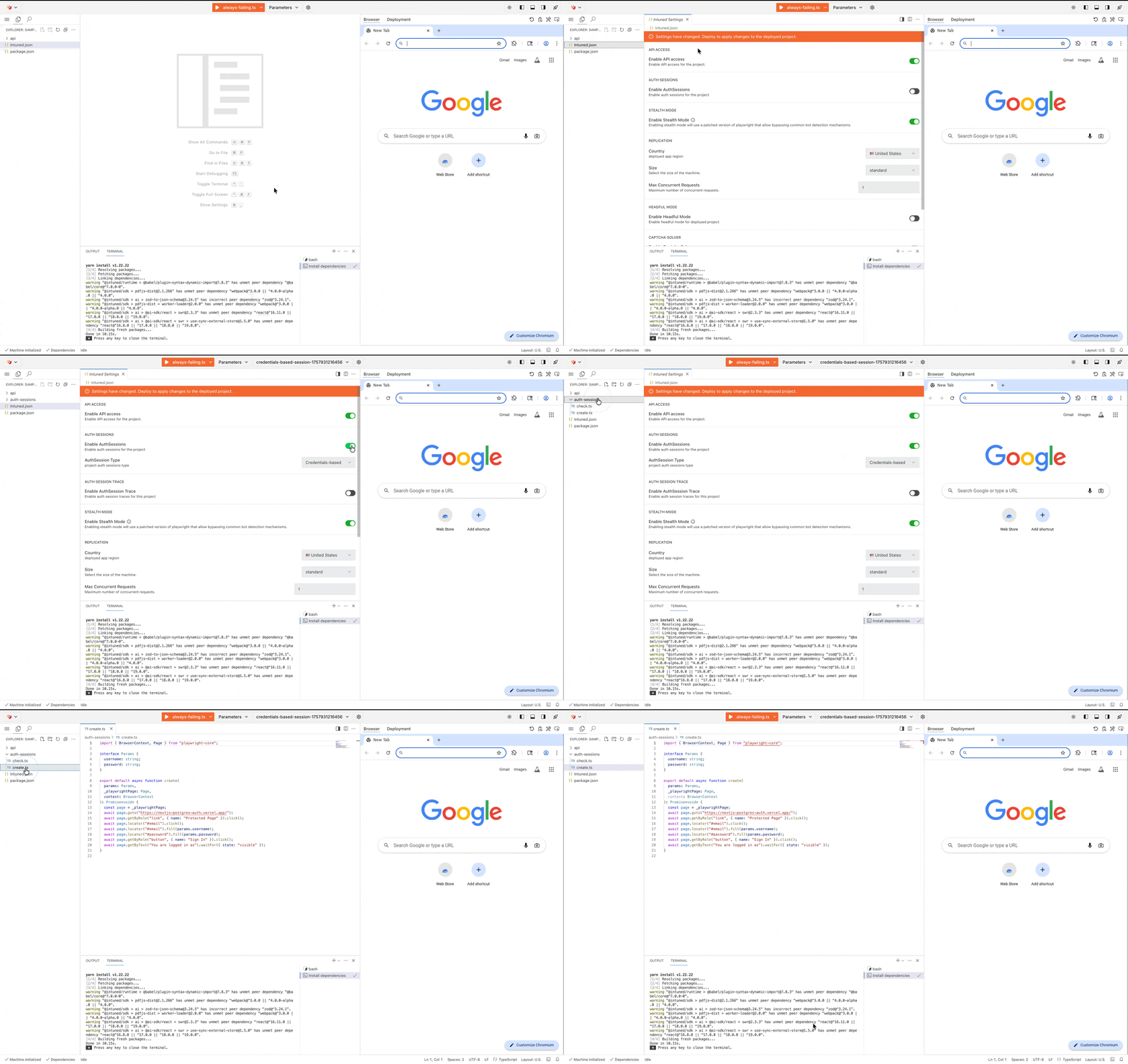
2. Implement the create API
The create API (auth-sessions/create) performs your login flow. It receives credentials and does whatever’s needed to authenticate—navigate to login pages, fill forms, handle redirects. After it completes, Intuned captures the browser state.
auth-sessions/create.ts
3. Implement the check API
The check API (auth-sessions/check) validates that a session is still authenticated. It runs before every Run to ensure your automation never executes with invalid credentials.
auth-sessions/check.ts
- Target lightweight pages or specific elements—avoid heavy page loads
- Check for content that only appears when authenticated (user menu, account name)
- Don’t just check for absence of login form—verify presence of authenticated content
4. Create an AuthSession
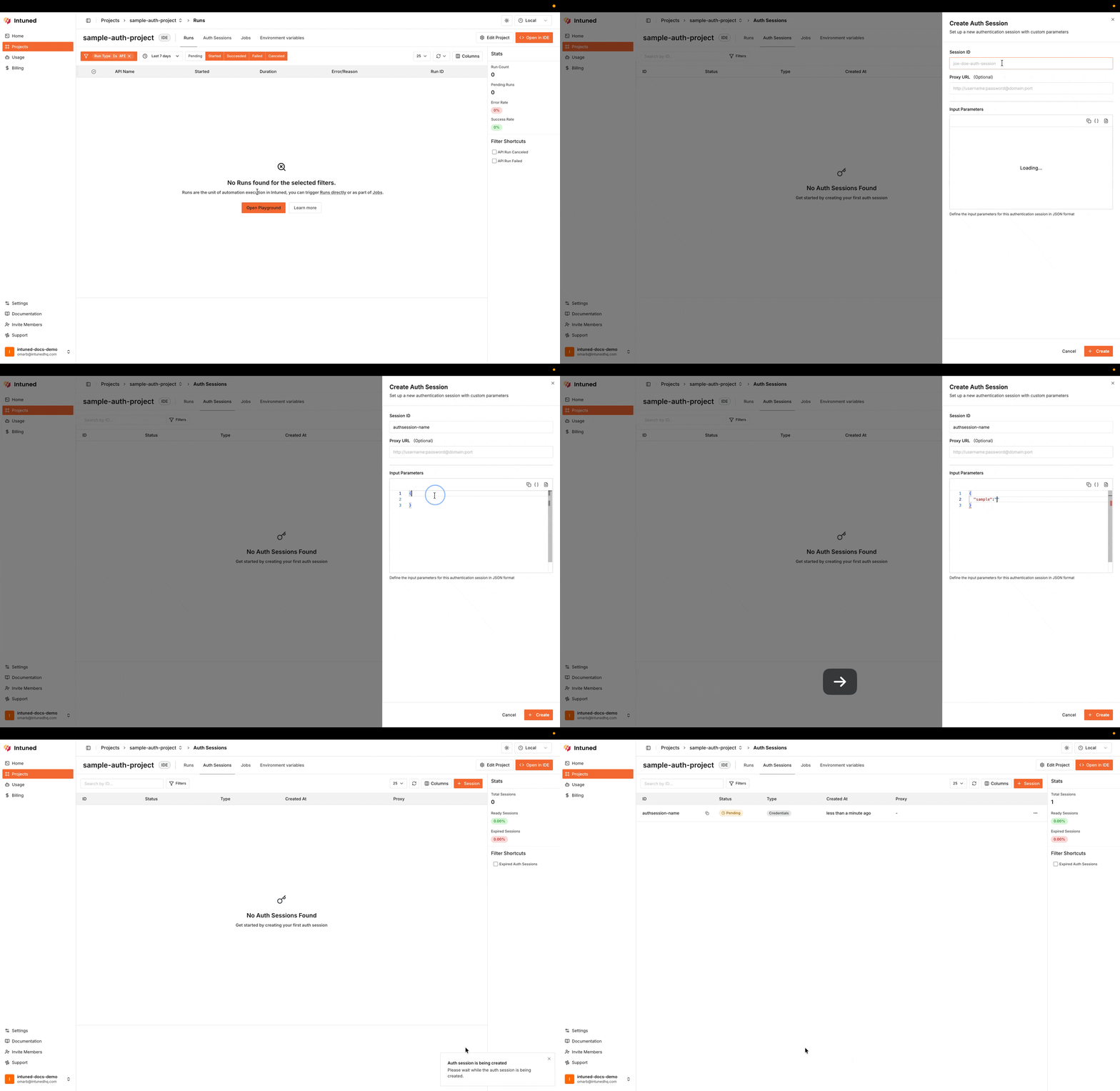
Once you have deployed your project with the create and check APIs, you can create an AuthSession and use it in your Runs. Check the deployment documentation if you need help deploying your project. The following examples show how to create an AuthSession via API, dashboard, or code.- API
- Dashboard
- Code
create-intuned-auth-session.ts
Check the AuthSessions Create API Playground for more details on creating AuthSessions via API.
5. Use the AuthSession in your Runs
When starting a Run, specify the AuthSession to use. Here’s an example of starting a Run with an existing AuthSession:trigger-intuned-run-with-auth-session.ts
Check the Runs API Playground for more details on starting Runs via API.
How AuthSessions work
When you run an API in an AuthSession-enabled project:- Validation: Before your code runs, Intuned checks if the AuthSession is still authenticated by running your
checkAPI. - Auto-recreation: If validation fails and auto-recreation is enabled (the default), Intuned runs your
createAPI to log in again, then re-validates. - Execution: Only after validation succeeds does your API code run.
AuthSession Runs in your project
AuthSession operations appear as special Run types in your Runs list:| Run type | When it triggers | What it does |
|---|---|---|
AuthSession:Validate | Before each API Run attempt | Runs check API; if it fails and auto-recreate is on, runs create then check again |
AuthSession:Create | When you create an AuthSession via dashboard or API | Runs create API, then check to confirm success |
AuthSession:Update | When you update an AuthSession’s credentials | Runs create with new credentials, then check to confirm |
AuthSession:Validate fails, the dependent API Run is canceled (not marked as failed).
Usage patterns
AuthSessions support two common patterns: Single account automation: One account performs multiple operations. Create a single AuthSession and use it to start all Runs. Good for internal tools where you scrape analytics, export reports, and update settings—each as a separate API, all sharing one AuthSession. Multi-account automation: Each user has their own AuthSession. Your app creates an AuthSession when a user “connects” their account, then runs automations on their behalf. Good for tools like social media managers where each user connects their own account.AuthSession types
The setup above uses credentials-based AuthSessions, which is the most common type. Intuned stores your credentials securely and uses them for automatic recreation when sessions expire. Two other types are available for specific situations:| Type | Who authenticates | Auto-recreation | When to use |
|---|---|---|---|
| Credentials-based | Code | ✓ | Standard login flows (default) |
| Runtime-based | Code | ✓ | Changing credentials (OTPs, temp tokens) |
| Recorder-based | Human | ✗ | Complex login (MFA, CAPTCHA, biometrics) |
Runtime-based AuthSessions
Pass credentials with each Run instead of storing them. Use this when credentials change frequently (like OTPs) or can’t be stored.trigger-intuned-run-with-runtime-auth-session.ts
Recorder-based AuthSessions
Recorder-based AuthSessions let a human log in through a hosted browser. Intuned captures the authenticated state after login completes. Use this for login flows that require human interaction (MFA apps, biometrics, complex CAPTCHAs).To enable recorder-based AuthSessions, contact support via Slack or
email.
Configuration options
Validation and recreation settings
Control how Intuned handles validation and recreation per Run.trigger-intuned-run-with-validation-settings.ts
| Option | Default | Description |
|---|---|---|
autoRecreate | true | If validation fails, run create to get a new session |
checkAttempts | 1 | Times to retry the check API before considering validation failed |
createAttempts | 1 | Times to retry the create API if recreation triggers |
Updating credentials
Update stored credentials for a credentials-based AuthSession:trigger-intuned-auth-session-update.ts
Proxy support
Configure a proxy when creating an AuthSession. All Runs using that AuthSession—including validation and recreation—route through the proxy.create-intuned-auth-session-with-proxy.ts
Using AuthSessions in Jobs
Specify the AuthSession in the Job configuration. All Runs in the JobRun use the same AuthSession.create-intuned-job-with-auth-session.ts
Best practices
- Make check fast and reliable. Target lightweight endpoints or specific DOM elements. Check for authenticated content, not just absence of login forms.
- Use single-account pattern for internal tools. Fewer AuthSessions to manage and simpler credential rotation.
- Separate AuthSessions per user. For multi-user integrations, never share AuthSessions across users.
- Set appropriate retry attempts. Increase
checkAttemptsfor flaky networks; increasecreateAttemptsif login sometimes fails transiently. - Enable CAPTCHA solving if needed. Configure in
Intuned.jsonif your target system uses CAPTCHAs during login.
Limitations
- AuthSession type can’t change after creation—create a new one to switch types.
- Recorder-based AuthSessions can’t auto-recreate; they need human intervention when expired.
- Validation adds latency since check runs before every attempt—keep your check API fast.
- AuthSessions are project-scoped; you can’t use one from another project.
FAQs
How long do AuthSessions last?
How long do AuthSessions last?
AuthSessions persist indefinitely in Intuned, but the underlying session with the target system depends on that system’s policies. Some expire after hours, others after weeks. With auto-recreation enabled, AuthSessions effectively last as long as your credentials remain valid.
What happens if my password changes?
What happens if my password changes?
For credentials-based AuthSessions, use the update API to provide new
credentials. For runtime-based, pass the new credentials in your next Run. For
recorder-based, have a human log in again through the recorder.
Validation keeps failing even though I can log in manually
Validation keeps failing even though I can log in manually
Your check API may not accurately detect authenticated state. Common issues:
checking before the page fully loads, checking for elements that appear on
both authenticated and unauthenticated pages, or not handling redirects
properly. Review your check API to ensure it waits for page load and checks
for content that only appears when authenticated.
Auto-recreation triggers too often
Auto-recreation triggers too often
Frequent recreation may indicate incorrect check logic or sessions expiring faster than expected. Verify your check API isn’t too strict (failing on transient issues), and investigate the target system’s session duration. Consider increasing
checkAttempts to handle transient failures.Related resources
AuthSessions API reference
Complete API documentation for AuthSession operations
Intuned in depth
Detailed explanation of how AuthSessions integrate with Intuned’s execution
model
Jobs and batched executions
Use AuthSessions with scheduled and batched workflows
Stealth mode, CAPTCHA, and proxies
Configure CAPTCHA solving and proxies for authentication